What to record in a vehicle maintenance log
Published 2026-10-16 · Updated 2026-10-16

A vehicle maintenance log is a list of what was done, when, and at what mileage, plus where the paper is. It is not a schedule printed for every car. The owner's manual sets the intervals. The log stores the dates you copy from invoices and the interval you copy from that manual.
Fields a household log actually needs
Write these for each car, in ordinary words:
- Where the title is kept, and where the registration is kept, plus the renewal date printed on the card. Copy the date. Do not calculate it.
- Each finished job: date, mileage, the work as the invoice describes it, the provider, the cost, and where the receipt or the follow-up note is filed.
- Repeating jobs, such as oil or a cabin filter: a blank interval line. Fill it from the owner's manual for that car.
Tire pressure and oil grade belong in that manual, not in a blank template. FuelEconomy.gov says the proper tire pressure is usually on a sticker in the driver's side door jamb or the glove box and in the owner's manual, and that the maximum pressure printed on the tire sidewall is the wrong figure to use. The same page says to use the manufacturer's recommended grade of motor oil. Copy those figures from the sticker and the manual. A log that prints a pressure or a grade for you is guessing.
Date, mileage, and the invoice
Date and mileage let the next visit be compared with the interval in the owner's manual. Without both, "we did the brakes last year" is a memory, not a record. Mileage is the odometer reading on the day of the work, copied from the dash or from the invoice, not a rounded guess months later.
The work line should match the invoice. "Service" is too vague for a later reader. "Replaced front pads and rotors" is something a buyer or a warranty reviewer can check against the paper. Provider and cost answer who did it and what the invoice charged. The receipt location answers where that paper is now: a folder, a glove box, a shop portal printout.
If a warranty booklet asks for proof that a listed service was done, the invoice is the proof. The log is how you find the invoice. This page does not say any warranty requires a particular shop or a particular brand of part. Read the booklet you have.
A title report is a different record
An NMVTIS vehicle history report is intended to provide data on five key indicators: current state of title and last title date, brand history, odometer reading, total loss history, and salvage history. Brands on that page include labels such as junk, salvage, and flood. That is title information. It is a different record from a shop invoice for an oil change.
Keep the shop history yourself if you want it later. A dealer or a shop may still have its own file. That file is theirs. Your log is the copy you control.
What the opened pages are built for
The first result's fleet article has no registration field and no title-location field.
That page, Simply Fleet, describes a vehicle maintenance log for owners, fleet managers, maintenance teams, and mechanics, and it talks about automation for a fleet. Useful if you run several work vehicles. A household with one or two cars still needs the registration renewal date and a note of where the title sits, which that article does not set out as fields.
The third result is a template described for commercial fleet owners. An opened personal-car guide (GarageHub) lists the date, the odometer reading, the work, parts, the cost, and the receipt, and it says to keep the shop invoice for warranty work. Those service fields match what a household log needs. Registration location is still a line you add.
Home tasks, including filter size and paint, are a separate file. They are on the home maintenance checklist. Contacts and document locations can sit in a home binder beside the car notes.
One visit, written out
After an oil change, the row is concrete. Date: the day on the invoice. Mileage: the odometer the invoice prints, or the one you read that morning if the invoice left it blank. Work: the line from the invoice, including the oil grade if the shop wrote it. Provider: the shop name. Cost: the total on the invoice. Receipt location: "glove box folder" or "shop email, March invoice." The interval line for the next oil change stays blank until you copy the miles or the months from the owner's manual for that engine. FuelEconomy.gov already said the grade and the tire pressure come from the manual and the door sticker. The log stores the copy. The grade choice stays in the manual.
When a shop portal and your page disagree, keep both and mark which one you trust for the date. The invoice in your hand is the paper a warranty reviewer can read. A portal screenshot is useful if you note where you saved it. A memory of "sometime last spring" is the row you replace as soon as you find the paper.
Two cars means two sets of those rows. A household that lends a car, or that has a second driver, still uses the same fields. The renewal date on each registration card is copied, not calculated. If the card and a reminder email disagree, the card is the source you write down, and you note the email only as a place you also looked.
Two cars, blank intervals
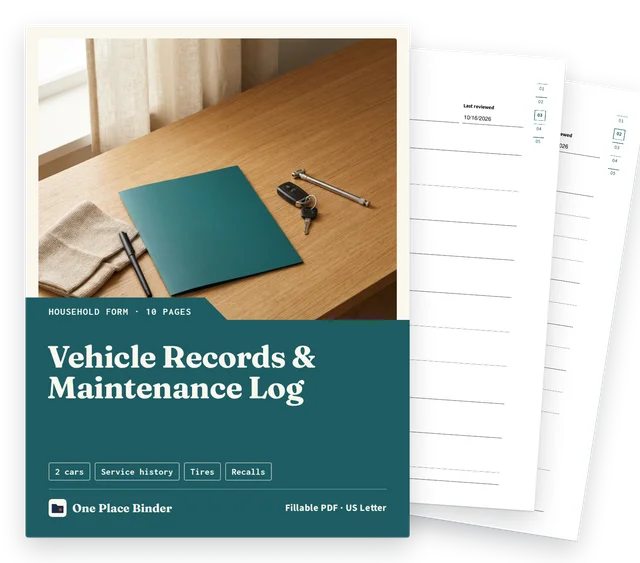
The Vehicle Records & Maintenance Log keeps two cars' facts, paperwork locations and service history together. The Vehicle Records & Maintenance Log has independent vehicle records for two cars, including title and registration locations and registration renewal dates. The Vehicle Records & Maintenance Log has three completed-service entries per car with date, mileage, work, provider, cost and receipt or follow-up location. The Vehicle Records & Maintenance Log has two recurring-task records per car with blank owner-manual intervals. The Vehicle Records & Maintenance Log is an instant download after checkout: one fillable PDF, US Letter. The Vehicle Records & Maintenance Log is $3.00. No service intervals are supplied on the Vehicle Records & Maintenance Log. Copy your own source information. Not legal advice. Not a will.
The honest limit of this page: it tells you which fields to copy. It does not know your car's interval, your state's renewal rule, or whether a warranty booklet will accept a particular invoice. Those answers are on the manual, the registration card, and the booklet.
Questions
How to do a maintenance log?
After each visit, copy the date, the mileage, the work as the invoice describes it, the provider, the cost, and where you put the receipt. For a repeating job, copy the interval from the owner's manual into a blank field. Keep the invoices themselves; the log only points to them.
Can I look up my car's maintenance history?
An NMVTIS vehicle history report lists five indicators: current state of title and last title date, brand history, odometer reading, total loss history, and salvage history. Oil changes and brake jobs are not in those five. Ask the shop that did the work, and keep your own copy of each invoice.
How to create a vehicle maintenance log?
Start with two facts copied from the papers you already have: where the title and registration are kept, and the registration renewal date on the card. Then add a row each time a shop or you finish a job. Leave the interval blank until you copy it from the owner's manual.
What should be included in a maintenance log?
Include the car's paperwork locations, each service date and mileage, the work, the provider, the cost, and the receipt location. Add a blank interval line for repeating jobs so the owner's manual, not a guess, supplies the timing.
Can I look up my car maintenance history?
Not from NMVTIS: the NMVTIS page on what a report includes names title, brand, odometer, total loss, and salvage, not oil changes. Some private vehicle-history providers or the shop that did the work may hold service records; your own invoices and the log you write are the copy you control.
How can I create a DIY vehicle maintenance log?
Rule a page with columns for date, mileage, work, provider, cost, and receipt location. Add a line for where the title and registration are kept. After each job, copy those fields from the invoice before you file the paper.